
A parent asks Google for a dentist nearby who is good with children, and the AI answer names three clinics. To be one of them, you need what already works on Google: pages that answer people’s questions in plain text, a complete Google Business Profile with real reviews, and other websites that mention you. ChatGPT also has to be allowed to read your site.
- AI Overviews, the short AI-written answers at the top of Google, appeared on 43% of US searches in May 2026, according to an estimate by the web data company Similarweb.
- AI Mode, a Google tab for long questions and follow-ups, passed 1 billion monthly users in May 2026, Google says.
- Since 31 August 2026, Search Console, Google’s free tool for website owners, shows how often your pages appear in both.
Sources: TechCrunch, 27 July 2026, Google: Search at I/O 2026, Google Search Central.
Published 10 September 2026, updated 13 October 2026.
In this guide
A 5-minute test: what AI says about you today
- Open ChatGPT, Gemini (Google’s AI assistant) and the AI Mode tab on Google.
- Ask what a customer would ask, with your trade and your town: "best hairdresser in Rotterdam" or "who repairs bikes in Leeds".
- Then ask about you by name: "What do you know about [your business]?"
- Write down whether you’re named, whether your opening hours, prices and address are right, and which competitors are named, with the reason the AI gives.
If the AI says a competitor "has many good reviews" or "offers a free first consultation", it found that somewhere. Put the same kind of facts about you where it can find them. Answers change from day to day, so ask a few times, in more than one tool.
What to fix on your website so the AI quotes it
Google’s AI picks pages with the same ranking systems as normal search, so what helps you on Google helps here too. Nothing is guaranteed.
- Write what only you can write. Google asks for content based on your own experience. A page about bathroom renovation in Manchester with real projects, prices and travel times gives the AI something to quote.
- Put the facts in plain text: what you do, for whom, where, your opening hours, how to book, and a starting price or typical range. Keep them out of images and PDFs, as Google asks.
- Answer the questions people ask by phone and email, in two or three sentences each. People who tried AI Mode asked much longer questions than in normal search, Google says.
- Make one good page per service. Google’s spam rules forbid pages made mainly to catch every way people might search. A list of 30 town names helps nobody.
Sources: Google: optimizing for generative AI features (15 May 2026, updated 10 July 2026), Google Search Central: AI features and your website.
The technical settings
Google and ChatGPT read websites with programs called crawlers, and ChatGPT leaves out sites that block its crawler, OpenAI says.
- In robots.txt, allow Googlebot and OAI-SearchBot (ChatGPT search). You can still block GPTBot, which OpenAI uses to collect training data.
- Your pages must be indexed and allowed to show a snippet.
- Google’s AI features need no special file, no "chunked" text and no special schema markup.
Sources: OpenAI: crawlers, Google: optimizing for generative AI features.
Your Google profile, reviews and mentions
When someone asks for a business nearby, Google uses its Business Profile, the box with opening hours, photos, map pin and reviews. It ranks local results by relevance, distance and how well known you are, and that last one counts your reviews and the websites that link to you.
- Fill in everything: category, services, opening hours (holidays too), photos and a booking link.
- Send customers a direct link to leave a review, and answer every review, good or bad, as Google recommends.
- Get mentioned where your customers look: the local newspaper, your trade association and review sites such as Tripadvisor.
If the links in your test keep pointing to one website for your trade and town, work on getting onto it.
Sources: Google Business Profile Help: local ranking, Google: optimizing for generative AI features.
Fewer clicks, and where to see your own numbers
When an AI Overview appears, 58% fewer people click the top result on average, Ahrefs found in desktop data for 300,000 search terms. Brands named in the overview got 35% more clicks than brands left out, according to Seer Interactive, which says it can’t prove the mention is the cause.
For a local business, being named can be enough: someone who reads your name can call, book or walk in without opening your site. To see your own numbers, open the generative AI report in Search Console. It counts how often your pages were shown in AI Overviews and AI Mode, not the clicks.
Sources: Ahrefs, 4 February 2026, Seer Interactive, 4 November 2025, Google Search Central blog, 3 June 2026, Search Console Help: Search generative AI control.
Where to start
- Do the 5-minute test in ChatGPT, Gemini and AI Mode, and write down who is named and why.
- Open Search Console. Under Settings, check that your site is included in AI answers (it’s on by default), then open the AI report. No Search Console yet? It’s free, and whoever runs your site can set it up.
- Fix your Google profile: opening hours, holiday hours, services and booking link, with the same details as on your site.
- Answer three questions people asked you this month, on your site.
- Ask three customers for a review, with a direct link.
- Run the test again in a month and compare.
How we get clients found
It’s the everyday work of our digital marketing team: fixing what keeps a site from being found, writing the pages people search for, and looking after the Google profile and its reviews, with a short monthly report in plain words. Once people find you, an AI receptionist or chatbot can answer their calls and chats, day and night.
Found a mistake, or a story we should cover? Email contact@pc113studio.no. If something is wrong, we fix it and note the change in the post.
New posts by email, once a week
One short email with the week’s posts on the topics you choose. Leave whenever you like.

More from the blog
Get your Black Friday deal before it ends
Free website demo
See your new website, or your redesign, before you decide. Ready 7 working days after we say yes.
When you go ahead
- Brand and clone protection
- Hosting, domain and email set up
- 24/7 support
We take on a limited number of requests. Send yours, and we reply with your offer.

Tell us what you need
Website, online shop, app, campaign or AI assistant, or an idea still taking shape. We reply personally by email within one working day.
Fill in the form, or reach us directly:


5.0 on Google · Studio in Sandvika
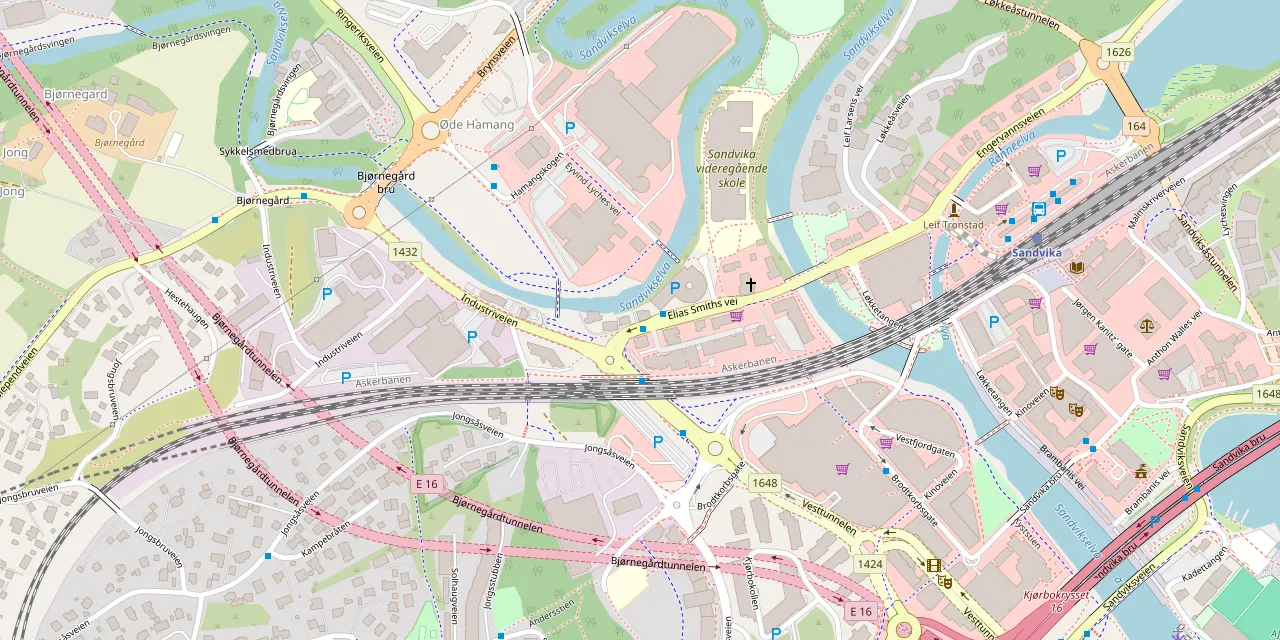
Visit us in Sandvika
Elias Smiths vei 25, 1337 Sandvika
Opening hours
- Monday–Friday
- 09:00–19:00
- Saturday
- 11:00–16:00
- Sunday
- Closed
Support: 24/7, every day
 Open in Google Maps© OpenMapTiles © OpenStreetMap